

Home dashboard overview
The Home dashboard summarizes your work at a glance. It opens on Overview, where widgets show your tasks, progress and recent activity. You choose which widgets appear and where they sit.
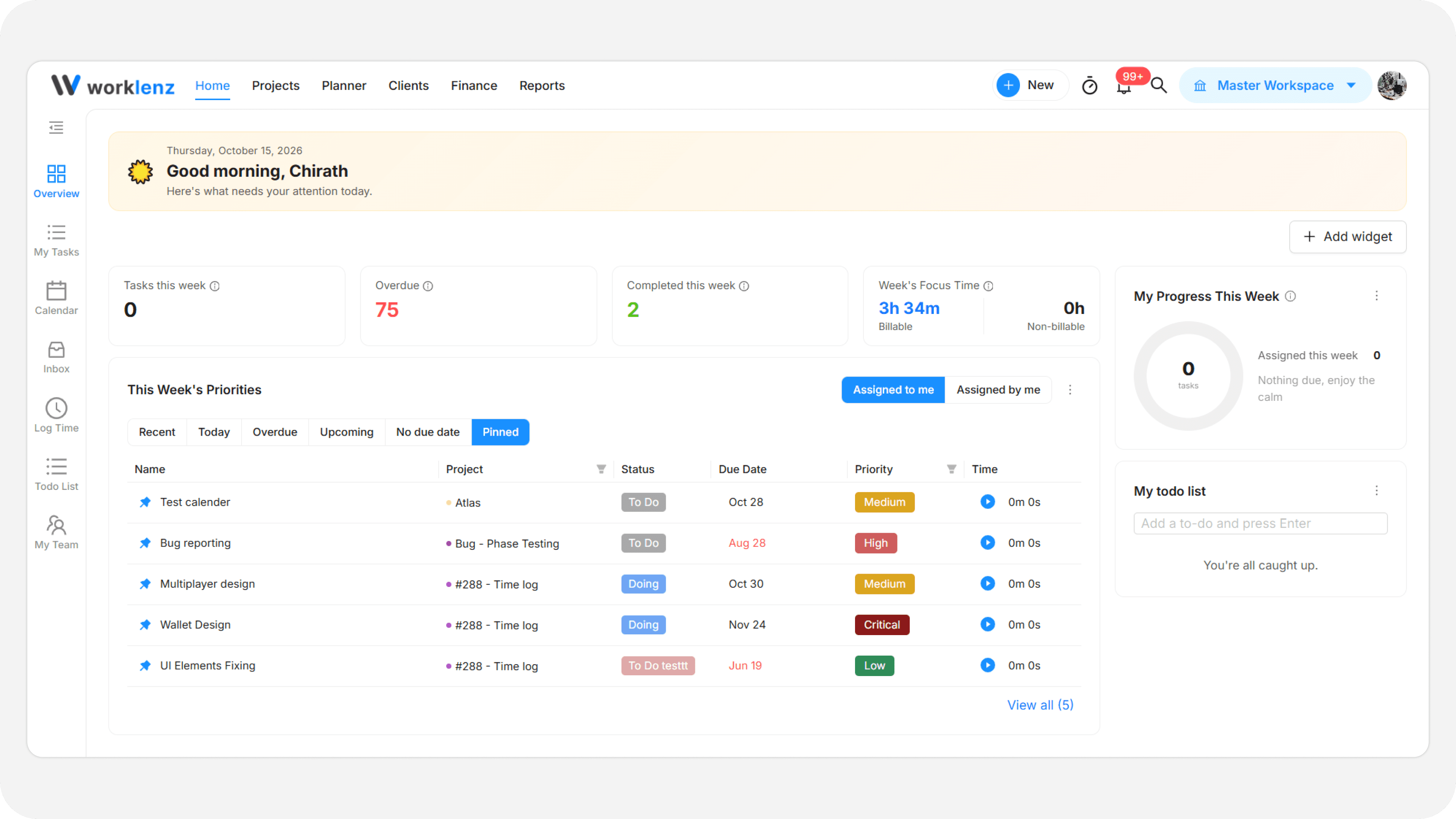
What you can do from the Home dashboard
- Check your numbers - See tasks due, overdue tasks, completed tasks and focus time on the Summary cards.
- Track progress - See a breakdown of your assigned work as Done, Doing and To Do.
- Work your priorities - Filter, sort and pin tasks in the Task priorities table.
- Resume recent work - Re-open recent projects, tasks, activity and logged time.
- Arrange the page - Add, move and remove widgets. See Customize your Home page layout.
- Reach personal tools - Use the Home sidebar for My tasks, Calendar, Inbox, Log time, Todo list and My team.
Default layout
| Area | Widgets |
|---|---|
| Top | Greeting banner |
| Main area | Summary cards, Task priorities |
| Side panel | My progress, My todo list |
Four more widgets are off by default: Team members, Tasks assigned by me, Comments mentioning me and Continue where you left off. Add them with the Add widget button. All eight are described in the widgets reference.
Today or This week
The numbers on Summary cards, My progress and Task priorities follow one shared Today / This week choice. Change it from the … menu of any of those widgets under Show. The default is This week. The Overdue card ignores this choice and always shows all open tasks past due.
Task priorities
The central table lists your active work. Switch between Assigned to me and Assigned by me, and use the tabs Recent, Today, Overdue, Upcoming, No Due Date and Pinned. You can change task details inline and pin up to 25 tasks. Tabs, default view and sorting are covered in Task priorities widget.
Your layout is yours
Layout changes save automatically to your own account and follow you to other devices. They do not change what teammates see. Below 1024 pixels wide, Home becomes a single column.
Personal navigation
Use the left sidebar under Home:
- My tasks - Your tasks across projects.
- Calendar - Deadlines in week, month or year views.
- Inbox - Cross-project updates.
- Log time - Manual time entries.
- Todo list - A personal checklist.
- My team - Team members and their projects.
Best practices
- Pick Today on busy days and This week for planning, because one choice drives all three period widgets.
- Customize once. Your layout is saved to your account, so it appears on every device.